While the Guest Book at the The-Raden is still not there, please leave a footprint in every post. Thank You ..
List of blogs to Google Search Engine
Raden
Raden
Although Search Engines are generally crawl on all websites or blogs that exist, but to optimize the index, should do registration or submit url blog or website. As we already know, Google is a search engine number one, and register the url blog or website to search engines is the first step to doing SEO (search engine optimization), namely to maximize the results of Google's index to the url blog or website and every page.
Here are the steps to register your blog / website into the Google Search Engine:
To get full access from Google, list Google first in the General Account (If you do not already have it).
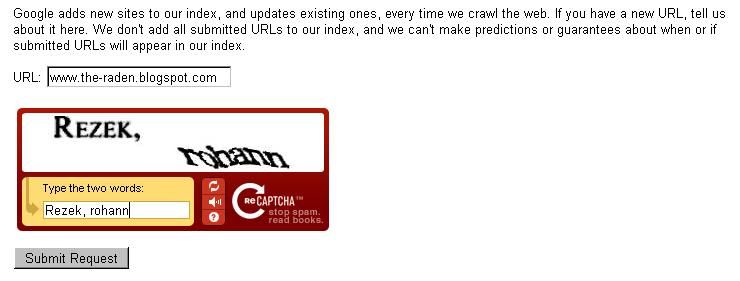
Submit your Blog or Website on Google by enteringUrl Add.
To learn and perform validation, go to Google Webmaster Tools. (Earlier create a blog, usually has validated via Automatic Verification HTML code)
Go to "Manage Site" -> "Add or remove owners".
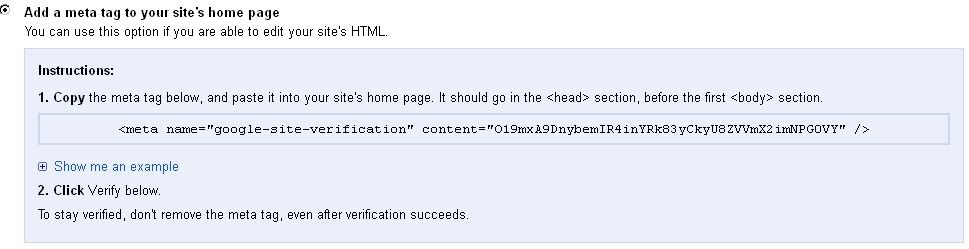
Go to the "Verify using a different method" -> tick the "Add a meta tag to your site's home page"
Copy the code and put it in your HTML template, exactly above the code </head>
Save. Wait some time and there will be a report in Webmaster Tools.
Meskipun mesin pencari umumnya merangkak di semua situs web atau blog yang ada, tetapi untuk mengoptimalkan indeks, harus melakukan registrasi atau mengirimkan url blog. Seperti yang sudah kita ketahui, Google adalah mesin pencari nomor satu, dan mendaftarkan url blog atau website ke mesin pencari adalah langkah pertama untuk melakukan SEO (Search Engine Optimization)
Berikut adalah langkah-langkah untuk mendaftarkan Blog ke dalam Search Engine Google:
Untuk mendapatkan akses penuh dari Google, daftar dulu di General Account Google (Jika anda belum memilikinya).
Daftarkan Blog atau Website anda di Google Add Url dengan memasukkan Url Blog atau Website.
Untuk mengetahui dan melakukan Validasi, lanjutkan ke Google Webmaster Tools. (Awal membuat Blog, biasanya telah tervalidasi secara Otomatis melalui HTML Verification code)
Pergi ke "Manage Site" -> "Add or remove owners".
Pergi ke "Verify using a different method" -> centang "Add a meta tag to your site's home page"
Copy code tersebut dan pasang di template HTML anda, tepatnya di atas kode </head>
Save. Tunggu beberapa waktu dan akan ada laporan di Webmaster Tools.
sepertinya bagus juga theory google webmaster ini untuk optimasi blog :) btw "Tesssssssssssssssssssssssssssssssssssssssssssssssssss" ngapain tuh sob :)) ada ada saja
Thanks for sharing this informative blog. Today's internet world learning Digital Marketing Course in Chennai is really useful to promote your business and improve your ROI, etc.

 Raden
Raden



3 comments:
hi there.. how are you my friend? hope u are fine. stay cool always..
sepertinya bagus juga theory google webmaster ini untuk optimasi blog :)
btw "Tesssssssssssssssssssssssssssssssssssssssssssssssssss" ngapain tuh sob :)) ada ada saja
Thanks for sharing this informative blog. Today's internet world learning Digital Marketing Course in Chennai is really useful to promote your business and improve your ROI, etc.
Post a Comment